TECHRENA

Welcome to the Technical Arena providing the latest updates and solutions!!

  • Entries
  • Comments

  • HOME
  • |
  • How To
  • |
  • Solutions
  • |
  • Windows 7
  • |
  • Techrena dot Net

Showing posts with label HP Laptops. Show all posts

How To Install a New RAM in Your Laptop

Labels: How To, HP Laptops, Solutions, System

Software updates are very common. What About hardware Upgrades? We need to upgrade the hardware as well to get on par with the developing technology. We need to upgrade our PCs and laptops to fit and to support the currently available software and operating system.

Here I have given the complete tutorial on how to install a new RAM in your Laptop. Why to spend for such a small and easy thing by giving it to a service center. Why not do it yourself?

Install New RAM

Click The link Below to see the complete Tutorial:

How To Install or Upgrade Your Laptop’s RAM (Physical Memory) - Techrena dot Net

Posted by Dennis on Sunday, April 11, 2010
6 comments

Integrate your own drivers or components in the Windows installation CD or DVD using nLite

Labels: How To, HP Laptops, Notebooks
We come through a lot of problems in installing our own Operating Systems in our laptops, like "Setup did not find any hard disk drives installed in your computer", etc. Here I have given a solution that will definitely solve these problems. Here we create our own Windows installation CD/DVD which will include all the drivers, etc. we want like the SATA driver. We have already seen one solution to this problem which uses the BIOS facility to activate the installation. The solution was a simple one but it is not ideal for some laptops.

We have to use software known as nLite to perform the driver integration operation. To download the software click here. For Downloading Intel SATA AHCI Drivers for Windows XP Click here. After successfully installing the software(nLite) follow the steps given below:

Step 1: Copy your Windows installation disc into some folder in your hard drive. Here I named my folder as WINXP.

Step 2: Open nLite. Click Next.

Step 3: Now Click Browse. Select the folder where you have copied your Windows installation Disc. Click OK.


Step 4: It will show the details of your installation. Click Next.

Step 5: As we don't have any Presets click next.

Step 6: Here it will show the activities you want to perform. Select Drivers in Integrate section and Bootable ISO in Create section. Click Next.
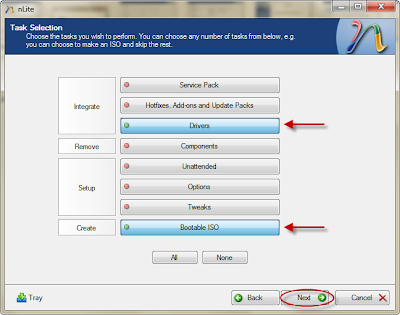
Step 7: Now click insert and select multiple driver option.


Step 8: You can browse and select the driver folder you want to integrate. Select All and OK.


Step 9: It will show you the details of the driver. Select All and Click Ok. After that cllick next. It will ask for confirmation. Click Yes.

Step 10: After it completes the integration process click next.

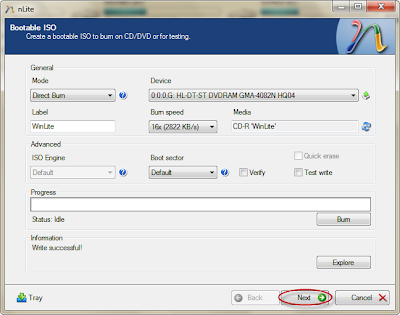
Step 11: Now you can burn your disc. Select direct burn.
Step 12: Click Burn. Confirm Yes.

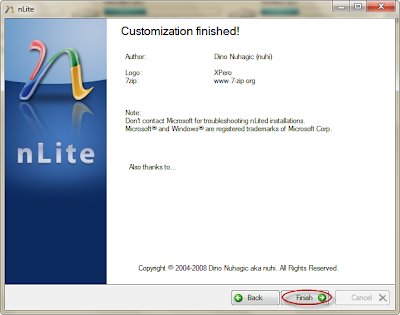
tep 13: Wait until it finishes. Click Finish.

Now you have successfully completed integrating the driver. You can use this CD for installation in any laptop where the SATA native is not supported.

You can use nLite for any purpose like integrating components, etc.

You can download the Intel SATA AHCI drivers from:

Download Intel SATA AHCI Drivers for Windows XP

Posted by Dennis on Thursday, January 29, 2009
18 comments

The HP Mini 1000 Series officially released | Specification & Price

Labels: HP Laptops


The HP Mini 1000 has been officially released.

The new HP models are:

1. HP Mini 1000
2. HP Mini 1000 Vivienne Tam Edition
3. HP Mini 1000 Mobile Internet Experience


The HP Mini 1000 comes in a piano-black finish and contains Microsoft Windows XP Home as well as an Ethernet jack, Wi-Fi and Bluetooth wireless capabilities and two USB ports.

The HP Mini 1000 Vivienne Tam Edition reflects the eponymous fashion designer's spring 2009 collection.

The HP Mini 1000 Mobile Internet Experience comes with a preloaded LINUX OS unlike the other two and focuses on providing Mobile Advanced internet facilities

Specification:

Consumers will be offered the choice of an 8.9-inch or 10.2-inch diagonal BrightView display and will be able to select either solid-state or mechanical hard drives. It will be powered by an Intel Atom processor, and it will be available in either Linux or XP. It will have either an 8GB or 16GB SSD or 60GB HDD, and the 3 cell battery is expected to deliver just over 3 hours of battery life.

The keyboard is a generous 92% of full size, and the touchpad is surrounded on both sides by the left and right-click buttons as opposed to having them below. It weighs a mere 2.25 lbs and is under an inch thick, and comes with HP's Imprint Finish, which is black with swirls.

Price:

The XP version will begin at $399, and the Linux at $379.
Posted by Dennis on Saturday, November 01, 2008
3 comments
Older Posts Home
Subscribe to: Posts (Atom)


  • Techrena Dot Net

Loading...

Enter your email address:

Delivered by FeedBurner

  • Blog Archive

    • ▼  2010 (14)
      • ▼  October (1)
        • WinX HD Video Converter Deluxe With Free License Code
      • ►  August (1)
      • ►  July (1)
      • ►  April (1)
      • ►  March (2)
      • ►  February (3)
      • ►  January (5)
    • ►  2009 (35)
      • ►  November (2)
      • ►  April (3)
      • ►  March (10)
      • ►  February (12)
      • ►  January (8)
    • ►  2008 (20)
      • ►  December (4)
      • ►  November (12)
      • ►  October (4)

    Labels

    • Acer Aspire (1)
    • Adsense (2)
    • apple (1)
    • Bing (1)
    • Blogger Tips (1)
    • Browers (2)
    • Canon (1)
    • Chrome (1)
    • Deep Linking (1)
    • Digital Cameras (1)
    • Downloads (3)
    • Drivers (1)
    • Firefox (1)
    • Gmail (1)
    • GodMode (1)
    • Google (7)
    • Greasemonkey (1)
    • How To (29)
    • HP Laptops (3)
    • Internet (1)
    • iPod (1)
    • Mobile Phones (4)
    • Network (2)
    • Nokia (4)
    • Notebooks (4)
    • oscars 2010 live (1)
    • Password (2)
    • PDA (1)
    • Router (2)
    • Solutions (15)
    • Sony Ericsson (1)
    • System (3)
    • TechNews (6)
    • USB BOOT (3)
    • Virtual XP (1)
    • Virus (1)
    • VistaSolutions (3)
    • watch online (1)
    • Websites (1)
    • Windows (8)
    • Windows7 (9)
    • Yahoo (1)
    • YouTube (2)

Copyright 2009 Techrena dot Net