TECHRENA

Welcome to the Technical Arena providing the latest updates and solutions!!

  • Entries
  • Comments

  • HOME
  • |
  • How To
  • |
  • Solutions
  • |
  • Windows 7
  • |
  • Techrena dot Net

Showing posts with label Notebooks. Show all posts

Download and Install Acer Crystal Eye Web Cam Driver for Windows 7

Labels: Acer Aspire, Drivers, How To, Notebooks, Windows7

Acer Laptop users are facing problem with the Webcam Driver while migrating to Windows 7. While other devices work with the Windows 7 inbuilt drivers, the Acer Crystal Eye Web cam device needs an explicit Driver.

Most of the available drivers give the error:

No Acer video capture device was detected on your system

Here we have given the correct driver for Windows 7 which works perfectly fine With Acer laptops.

Acer Cam Crystal eye Win7


The driver can be downloaded and installed from the link below:

Download Acer Cystal Eye Web Camera Driver for Windows 7

Posted by Dennis on Sunday, February 28, 2010
34 comments

Download Intel SATA AHCI Drivers for Windows XP

Labels: Downloads, Notebooks
For those who want to integrate the Intel SATA AHCI drivers for Windows XP in their windows installation CD, download the drivers from the link given below.

Download:

http://rapidshare.com/files/191912341/Intel_SATA_Driver.rar

Password: techrena

File Size: 474kB

How to Integrate Sata Driver in XP CD:
http://techrena.blogspot.com/2009/01/integrate-your-own-drivers-or.html
Posted by Dennis on Saturday, January 31, 2009
11 comments

Integrate your own drivers or components in the Windows installation CD or DVD using nLite

Labels: How To, HP Laptops, Notebooks
We come through a lot of problems in installing our own Operating Systems in our laptops, like "Setup did not find any hard disk drives installed in your computer", etc. Here I have given a solution that will definitely solve these problems. Here we create our own Windows installation CD/DVD which will include all the drivers, etc. we want like the SATA driver. We have already seen one solution to this problem which uses the BIOS facility to activate the installation. The solution was a simple one but it is not ideal for some laptops.

We have to use software known as nLite to perform the driver integration operation. To download the software click here. For Downloading Intel SATA AHCI Drivers for Windows XP Click here. After successfully installing the software(nLite) follow the steps given below:

Step 1: Copy your Windows installation disc into some folder in your hard drive. Here I named my folder as WINXP.

Step 2: Open nLite. Click Next.

Step 3: Now Click Browse. Select the folder where you have copied your Windows installation Disc. Click OK.


Step 4: It will show the details of your installation. Click Next.

Step 5: As we don't have any Presets click next.

Step 6: Here it will show the activities you want to perform. Select Drivers in Integrate section and Bootable ISO in Create section. Click Next.
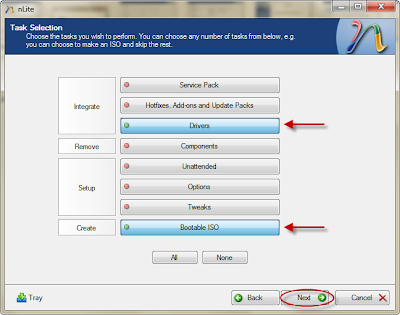
Step 7: Now click insert and select multiple driver option.


Step 8: You can browse and select the driver folder you want to integrate. Select All and OK.


Step 9: It will show you the details of the driver. Select All and Click Ok. After that cllick next. It will ask for confirmation. Click Yes.

Step 10: After it completes the integration process click next.

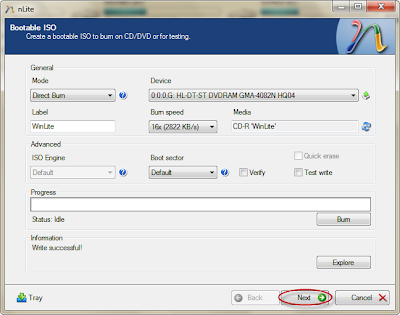
Step 11: Now you can burn your disc. Select direct burn.
Step 12: Click Burn. Confirm Yes.

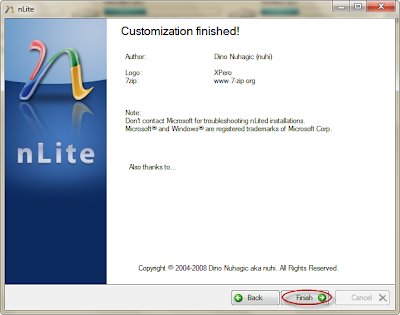
tep 13: Wait until it finishes. Click Finish.

Now you have successfully completed integrating the driver. You can use this CD for installation in any laptop where the SATA native is not supported.

You can use nLite for any purpose like integrating components, etc.

You can download the Intel SATA AHCI drivers from:

Download Intel SATA AHCI Drivers for Windows XP

Posted by Dennis on Thursday, January 29, 2009
18 comments

Tips to enhance your Notebook battery life longer

Labels: How To, Notebooks

Laptop battery life is the primary concern for most of the Notebook users now.Notebook users always want high performance and thus draining their batteries quickly[Of course you need to compromise at times for the sake of your battery].

First things first:If your notebook battery is too old check it’s condition using some tools available on the internet.

HP has it’s very own tool to check the conditions of notebook batteries.Longer Notebook or laptop battery life

Here are some tips that you can follow to maximize your Notebook battery life:

  1. Do ‘Defragment’ Regularly.Defragmentation speeds up your Hard disks thus reducing some extra burden on your notebook batteries.
  2. Dim your notebook display screen.You can turn down the brightness of your notebook’s display by using Function Keys[In most of the modern laptops].
  3. Don’t run a ‘virus scan’ unnecessarily when you are running on battery,virus scan does add extra load on the CPU so as on the batteries.
  4. Monitor your battery performance on a regular basis.
  5. Clean your battery Contacts:It’s always suggested to take out your battery once in two or three months and clean the metal contacts with cloth moistened with rubbing alcohol.
  6. Choose ‘Hibernate’ over ‘Standby’.Although Standby mode does save some power but it’s nowhere near when compared to ‘Hibernate’ mode,so opt for ‘Hibernate’ instead of ‘Standby’.
  7. Turn off laptop display when you are away from it for shorter duration.You can make use of external software like m_off to do this for you.
  8. Maintain Charging-Discharging balance.Once you completely charge your battery,allow it to discharge at least once in a week.
  9. Turn off Bluetooth,IR & wireless radios when running on battery if you no longer need them.
  10. Don’t attach USB devices[if you don’t really need them] attached to your notebook when running on battery.USB devices like iPod if kept attached to your notebook[for charging],are sure to drain your battery quickly.
  11. Make wise use of the ‘Power Options’ available in the ‘Control Panel’ of your windows.
Posted by Techie Blogger on Friday, December 19, 2008
46 comments
Older Posts Home
Subscribe to: Posts (Atom)


  • Techrena Dot Net

Loading...

Enter your email address:

Delivered by FeedBurner

  • Blog Archive

    • ▼  2010 (14)
      • ▼  October (1)
        • WinX HD Video Converter Deluxe With Free License Code
      • ►  August (1)
      • ►  July (1)
      • ►  April (1)
      • ►  March (2)
      • ►  February (3)
      • ►  January (5)
    • ►  2009 (35)
      • ►  November (2)
      • ►  April (3)
      • ►  March (10)
      • ►  February (12)
      • ►  January (8)
    • ►  2008 (20)
      • ►  December (4)
      • ►  November (12)
      • ►  October (4)

    Labels

    • Acer Aspire (1)
    • Adsense (2)
    • apple (1)
    • Bing (1)
    • Blogger Tips (1)
    • Browers (2)
    • Canon (1)
    • Chrome (1)
    • Deep Linking (1)
    • Digital Cameras (1)
    • Downloads (3)
    • Drivers (1)
    • Firefox (1)
    • Gmail (1)
    • GodMode (1)
    • Google (7)
    • Greasemonkey (1)
    • How To (29)
    • HP Laptops (3)
    • Internet (1)
    • iPod (1)
    • Mobile Phones (4)
    • Network (2)
    • Nokia (4)
    • Notebooks (4)
    • oscars 2010 live (1)
    • Password (2)
    • PDA (1)
    • Router (2)
    • Solutions (15)
    • Sony Ericsson (1)
    • System (3)
    • TechNews (6)
    • USB BOOT (3)
    • Virtual XP (1)
    • Virus (1)
    • VistaSolutions (3)
    • watch online (1)
    • Websites (1)
    • Windows (8)
    • Windows7 (9)
    • Yahoo (1)
    • YouTube (2)

Copyright 2009 Techrena dot Net