TECHRENA

Welcome to the Technical Arena providing the latest updates and solutions!!

  • Entries
  • Comments

  • HOME
  • |
  • How To
  • |
  • Solutions
  • |
  • Windows 7
  • |
  • Techrena dot Net

Blogroll in Blogger:Pass your blog’s PageRank to your favorite blogs

Labels: Blogger Tips

Blogger Blogroll:Why should you use it?


Last year Blogger has first unveiled this new feature in ‘Blogger in Draft’[later made available to all blogger.com blogs] called ‘Blog List’ which is similar to ‘Blogroll’ feature in Wordpress blogs.It may contain a list of your favorite blogs or the ones from your Google Reader’s subscriptions.


“A Blog List is much more than just a list of links: it's a live view of the blogs that matter to you. By default, your Blog List will show the most recently updated blogs first.”

Adding Blogger Blogroll to your blog:

It’s pretty much simple as you can see it is the first option available in your blog's Gadgets section[Go to Layout>>Page Elements>>Click Add a Gadget].

Blogroll Blogger Techrena

Then you can add your own blogs list or you can import your favorite blogs from your Google Reader’s subscriptions.
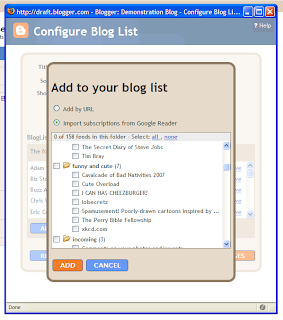
Adding a Blogger Blogroll to your blog Techrena

Advantages of Adding Blogroll:

It’s extremely helpful if you own more than one blog with one blog with Good PageRank and other with low PageRank.Unlike other JavaScript based Blogrolls,Blogger Blogroll is a HTML based gadget so all your links will get your blog’s Page Rank being passed to them.

Posted by Techie Blogger on Sunday, March 01, 2009

0 comments:

Post a Comment

Newer Post Older Post Home
Subscribe to: Post Comments (Atom)


  • Techrena Dot Net

Loading...

Enter your email address:

Delivered by FeedBurner

  • Blog Archive

    • ►  2010 (14)
      • ►  October (1)
        • WinX HD Video Converter Deluxe With Free License C...
      • ►  August (1)
        • Nokia N9 Leaked Pictures
      • ►  July (1)
        • Download Microsoft Security Essentials V2 Beta
      • ►  April (1)
        • How To Install a New RAM in Your Laptop
      • ►  March (2)
        • Watch Oscars 82nd Annual Academy Awards 2010 Onlin...
        • Create and Run Windows XP Virtual PC in Windows 7
      • ►  February (3)
        • Download and Install Acer Crystal Eye Web Cam Driv...
        • How to Install Windows 7 Using Bootable USB Disk D...
        • Sony Ericsson Aspen Unveiled – Specifications, Pic...
      • ►  January (5)
        • reCAPTCHA And Preventing Comment Spam In Websites
        • More GodMode Like Secret Windows 7 & Vista GUID Sh...
        • Fast Flips Comes To Google News Homepage
        • Funny: Bing Admits MSNbot is Slow !!
        • Google Animated Doodle For Newton’s Birthday
    • ▼  2009 (35)
      • ►  November (2)
        • Send Email Attachments Using Gmail Even When You A...
        • BSNL Prepaid Broadband Launched In AP
      • ►  April (3)
        • Install GreaseMonkey User Scripts in Google Chrome...
        • How to Transfer Contacts from One Gmail to Another...
        • How to Hide Inactive Icons in Windows Taskbar
      • ▼  March (10)
        • Solve Turn off Button Missing in Welcome Screen in...
        • Ophcrack USB Booting Windows Password Recovery for...
        • Windows Password Recovery|Crack Windows XP or Vist...
        • New Apple iPod Shuffle: Video, Features, Specifica...
        • Hide disk drives or partitions in Windows
        • “Check stopped - earnings credited back” seen in y...
        • Solve Windows cannot find explorer.exe startup pro...
        • Remove Windows cannot find regsvr.exe message at s...
        • Google’s interesting first tweet from Twitter :a s...
        • Blogroll in Blogger:Pass your blog’s PageRank to y...
      • ►  February (12)
        • Install Windows XP from USB Disk Drive
        • Adsense now allows publishers to change fonts in A...
        • Nokia N86 8 Megapixel Smart Phone Announced-Specif...
        • Canon PowerShot SX200 IS With 12X Zoom Announced
        • NOKIA 5630 Xpress Music announced-Price,Specificat...
        • How to remove Send Feedback Link From Windows 7 Ex...
        • Delete or Remove mfpmp.exe from a Windows 7 or Win...
        • How to take Ownership of a file in Windows Vista O...
        • Enable Subtitles in Windows 7 Media Player 12
        • Windows 7 Sidebar Not Working ? Enable it in easy...
        • How to remove Win 32 Sality gen Virus
        • Ask Techrena
      • ►  January (8)
        • Download Intel SATA AHCI Drivers for Windows XP
        • Integrate your own drivers or components in the Wi...
        • How to Find out your PC system properties?
        • Remote Desktop-Access your home computer from your...
        • Installing and configuring a Wireless Router
        • Connecting your computer or printer to a router
        • Using Firefox Keyboard Shortcuts for better browsi...
        • Youtube adds Download Options to some videos
    • ►  2008 (21)
      • ►  December (4)
        • Enable Hibernation on your computer
      • ►  November (12)
      • ►  October (5)

    Labels

    • Acer Aspire (1)
    • Adsense (2)
    • apple (1)
    • Bing (1)
    • Blogger Tips (1)
    • Browers (2)
    • Canon (1)
    • Chrome (1)
    • Deep Linking (1)
    • Digital Cameras (1)
    • Downloads (3)
    • Drivers (1)
    • Firefox (1)
    • Gmail (1)
    • GodMode (1)
    • Google (7)
    • Greasemonkey (1)
    • How To (30)
    • HP Laptops (3)
    • Internet (1)
    • iPod (1)
    • Mobile Phones (4)
    • Network (2)
    • Nokia (4)
    • Notebooks (5)
    • oscars 2010 live (1)
    • Password (2)
    • PDA (1)
    • Router (2)
    • Solutions (15)
    • Sony Ericsson (1)
    • System (3)
    • TechNews (6)
    • USB BOOT (3)
    • Virtual XP (1)
    • Virus (1)
    • VistaSolutions (4)
    • watch online (1)
    • Websites (1)
    • Windows (8)
    • Windows7 (9)
    • Yahoo (1)
    • YouTube (2)

Copyright 2009 Techrena dot Net